


Fecha: 4 de August de 2026 Noelia Leiro
Integrating ChatGPT (or another artificial intelligence API) into a mobile app can improve the user experience, automate support and personalize interactions, but it requires choosing the right model, controlling costs per token and designing a scalable architecture.
In this guide we explain step by step how to do it, how much it really costs and what mistakes you should avoid, applying Actualizatec’s INTEGRATE Framework: our 8-step methodology to successfully implement AI in mobile apps.
Here is the video where we tell you about it:

Why integrate artificial intelligence into your app?
The integration of language models such as ChatGPT into mobile apps is no longer an experimental trend but a real competitive advantage. According to Duolingo data (Q4 2025), its AI-powered premium tier – Duolingo Max – already accounts for 5% of its paid subscribers, and has been one of the main drivers of growth in revenue per user(Source: Duolingo Shareholder Letter Q3 2025).
Specific benefits include:
- Improved user experience: natural language interaction, personalized recommendations and contextual assistance within the app.
- 24/7 support at no incremental cost: an AI wizard can resolve frequent queries around the clock, reducing the burden on the support team.
- Automation of repetitive tasks: answering FAQs, generating personalized content, classifying tickets or moderating comments.
- Higher retention: users who find smart and useful features stay longer. This connects directly to the user experience on mobile. Duolingo reported 36% year-over-year growth in daily active users in Q3 2025(Source: Duolingo 10-K, SEC Filing, February 2026).
If you don’t know how to do it, write us here and we will help you. Now let’s see some of the benefits it can bring to your app.
INTEGRATE framework: Actualizatec’s methodology for implementing AI in apps
At Actualizatec we have developed the INTEGRATE Framework, an 8-step methodology to guide the integration of artificial intelligence in mobile apps in a cost-effective and scalable way:
| Step | Action | Description |
|---|---|---|
| I – Identify | Identify the user’s need | What real problem does AI solve in your app? Don’t integrate ChatGPT “because it’s trendy”. Validate with usage data. |
| N – Negotiate model | Select the right model and vendor | Compare GPT-4o-mini, Claude Haiku, Gemini Flash by cost, latency and capacity. |
| T – Test endpoint | Test the API in development environment | Configure API keys, make test calls and measure real response times. |
| E – Evaluate cost | Calculate cost per user/session | Estimate tokens per interaction × price per million tokens × monthly sessions. |
| G – Manage rate limits | Configure limits and fallbacks | Implement retries, queues and backup models for traffic peaks. |
| R – Refine prompts | Optimize system prompts | A good system prompt reduces unnecessary tokens and improves response quality. |
| A – Automate moderation | Filter content and protect the user | Add security filters, inappropriate content detection and logging. |
| TE – Test UX + Escalate | Validate with real users and scale | Do A/B tests, measure NPS of the AI wizard and scale progressively. |
Step by step: how to connect the OpenAI API to your app
Step 1 – Gain access to the API
Register at platform.openai.com and generate an API key. OpenAI offers limited initial free credits for testing.
Step 2 – Choose integration method
There are two main ways:
Option A: Direct API Calls. They give you full control over the parameters (model, temperature, maximum tokens). Simplified example in Python:
import openai

client = openai.OpenAI(api_key="TU_API_KEY")

response = client.chat.completions.create(
    model="gpt-4o-mini",
    messages=[
        {"role": "system", "content": "Eres un asistente de la app X. Responde de forma concisa."},
        {"role": "user", "content": mensaje_del_usuario}
    ],
    max_tokens=300,
    temperature=0.7
)

respuesta = response.choices[0].message.content
Option B: Official OpenAI SDKs. Available in Python, Node.js, Java and more. They simplify authentication, error handling and response streaming.
Step 3 – Configure the backend
Never expose your API key directly in the mobile app code. The correct architecture is:
App móvil → Tu servidor backend (con la API key) → API de OpenAIThis protects your key, allows you to control costs and add business logic (filters, logs, limits per user).
Step 4 – Design the system prompt
The system prompt defines the behavior of the wizard. A well-designed prompt can reduce token consumption by 30-50 % and drastically improve quality. It includes:
- Assistant’s role and personality
- Clear limits (what NOT to answer)
- Expected response format
- App and user context
Step 5 – Implement cost control
Configure:
max_tokensper answer (limits the cost per call)- Daily limits per user
- Cache frequent responses to avoid redundant calls. Measure impact with Firebase Analytics.
- Economy model (GPT-4o-mini) for simple tasks, premium model (GPT-4o) only for complex tasks
How much does it cost to integrate ChatGPT into an app? APIs comparison table [2026].
One of the most important factors is the cost per token. Here is the updated comparison as of April 2026 of the main AI APIs available for apps:
| API / Model | Input (per 1M tokens) | Output (per 1M tokens) | Max. context | Best for |
|---|---|---|---|---|
| OpenAI GPT-4o | $2,50 | $10,00 | 128K | Complex, multimodal reasoning |
| OpenAI GPT-4o-mini | $0,15 | $0,60 | 128K | High-volume chatbots, rating |
| OpenAI GPT-5.2 | $1,75 | $14,00 | 200K+ | Flagship model, advanced reasoning |
| Anthropic Claude Sonnet 4.6 | $3,00 | $15,00 | 1M | Tasks requiring extensive context |
| Anthropic Claude Haiku 4.5 | $1,00 | $5,00 | 200K | High volume apps with good quality |
| Google Gemini 3.1 Pro | $2,00 | $12,00 | 1M | Advanced multimodal, Google ecosystem |
| Google Gemini 3 Flash | $0,50 | $3,00 | 1M | Speed/cost balance |
| Google Gemini 2.5 Flash-Lite | $0,10 | $0,40 | 1M | Maximum economy, simple tasks |
Sources: OpenAI Pricing – Anthropic Pricing – Google AI Pricing – Data verified as of April 2026.
How much would it cost in practice?
Example: an app with 10,000 daily active users, where each user makes 3 queries/day of ~500 input tokens and ~200 output tokens:
- With GPT-4o-mini: ~$0.15 × 15M input + $0.60 × 6M output = $2.25 + $3.60 = ~$5.85/day (~$175/month)
- With Gemini Flash-Lite: ~$0.10 × 15M + $0.40 × 6M = $1.50 + $2.40 = ~$3.90/day (~$117/month)
- With GPT-4o: ~$2.50 × 15M + $10 × 6M = $37.50 + $60 = ~$97.50/day (~$2,925/month)
The difference between choosing the right and wrong model can be 25x in monthly cost for the same volume of usage.
5 common mistakes when integrating AI into apps (and how to avoid them)
- Expose the API key in the frontend. Any user could extract it and generate costs in your account. Always route through your backend.
- Do not limit
max_tokens. Without limit, a single response can consume thousands of tokens. Set a reasonable maximum per use case (150-500 tokens for chatbots). - Use the most expensive model by default. GPT-4o-mini handles 80% of typical queries with sufficient quality. Reserve GPT-4o or premium models for tasks that really need it.
- Ignore latency. Mobile users expect responses in < 2 seconds. Implement streaming (server-sent events) so that text appears progressively.
- Do not validate the AI output. Models can freak out. Add validation, security filters and an option for the user to report errors.
Case Study: Duolingo Max and the integration of GPT-4 in education
Duolingo is an excellent example of strategic AI integration in apps. With over 133 million monthly active users and 52.7 million daily active users in Q4 2025(Source: Duolingo Q4/FY2025 Shareholder Letter), the company partnered with OpenAI to launch Duolingo Max, a premium subscription tier with two AI-powered features:
- “Explain my Answer”: upon making a mistake in an exercise, the user can open a chat with Duo to get a detailed explanation of why their answer was correct or incorrect, with additional examples.
- “Role Play”: allows you to practice conversations with AI characters in real-world scenarios (ordering coffee, talking about vacations, buying furniture), receiving feedback on accuracy and complexity.

What is Duolingo Max’s “Explain my Answer” and “Role Play” and how do they use AI?
Making mistakes is part of the learning process. But in order to really learn, the key is to understand why you made that mistake. The “Explain my Answer” feature provides students with the opportunity to get a detailed explanation of why their answer was correct or incorrect. At the touch of a button after certain exercises, students can initiate a chat with Duo, where they will get additional clarification and examples. In addition, each session also has the option to offer an or after receiving the explanation. 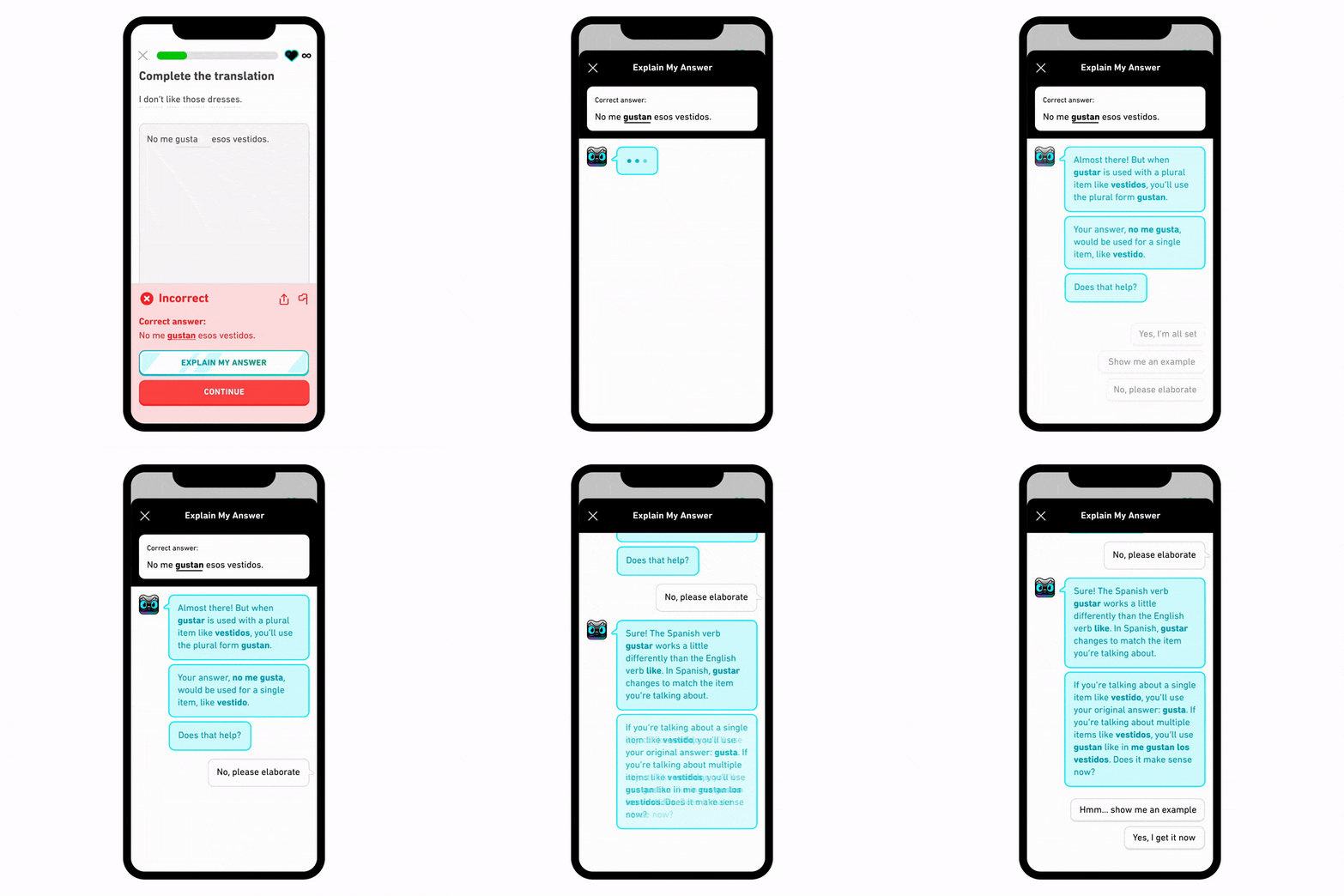 “Role Play” is a feature that allows students to practice their conversational skills in the application with real-world characters. Challenges are presented as “side missions” on the learning path and cover a variety of scenarios. Whether it’s talking about future vacations, ordering coffee at a coffee shop, or shopping for furniture, so students can engage in interactive conversations with GPT-4’s AI. They then receive feedback on the accuracy and complexity of their answers, as well as tips for future conversations.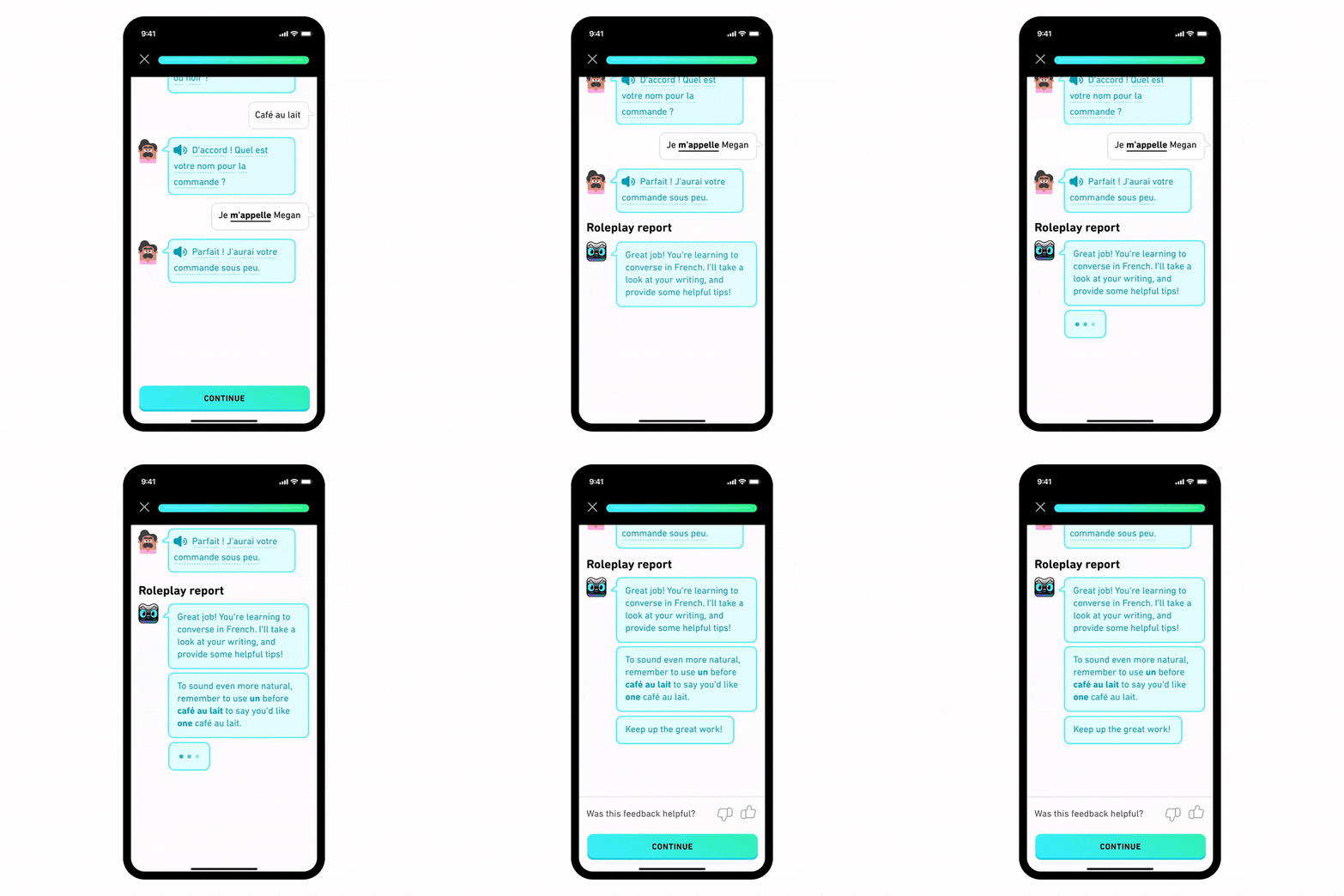
SOURCE: open.ai
Initially, these features will be available in the Spanish and French courses for English speakers in the iOS app. However, Duolingo plans to expand them to more courses and platforms in the near future, as well as to more countries.
It is critical to note that ChatGPT-4 AI-generated content is reviewed by Duolingo experts to ensure accuracy and proper tone. What if the AI makes a mistake?
We know that technology is never perfect (hey, and neither are humans!). If users find any bugs, they have the option to report them, thus contributing to improve the quality of the system.
Key lessons from the Duolingo case for your app:
- AI solved a real problem: users needed conversational practice, something that standard lessons did not provide.
- Human review of output: content generated by GPT-4 is reviewed by Duolingo experts before being served.
- Direct monetization: AI features are behind a premium tier, turning AI into a revenue generator, not just a cost. If you want to explore more models, discover all the strategies to monetize your app.
- User feedback: users can report AI errors, feeding a continuous improvement cycle.
(Source: OpenAI Customer Story – Duolingo)
AI is revolutionizing the way people acquire new skills and is bringing high-quality education to people around the world. And, above all, it is revolutionizing the world of apps.
Glossary of key terms
| Term | Definition |
|---|---|
| API (Application Programming Interface) | Interface that allows your app to communicate with an external service such as OpenAI or Google AI. See our [complete guide on what an API is]. |
| Token | Text unit that processes the model. 1 token ≈ 4 characters in English, ≈ 3 characters in Spanish. 1,000 words ≈ 1,300 tokens. |
| System prompt | Initial instruction defining the behavior of the model (role, tone, limits). It is not visible to the end user. |
| Rate limit | Limit of requests per minute/day allowed by the API. Varies by plan and model. |
| Endpoint | Specific URL of the API to which you are sending requests (e.g. https://api.openai.com/v1/chat/completions). |
| Fine-tuning | The process of training a base model with your own data to specialize it in your domain. |
| Latency | Time between the user sending a query and receiving the first part of the response. |
| Streaming | Technique that sends the response token to token in real time, improving the perception of speed. |
| Prompt caching | Storage of repeated instructions to reduce cost in successive calls (savings up to 90%). |
| Batch API | Asynchronous batch request processing with 50% discount, ideal for non-urgent tasks. |
Frequently Asked Questions (FAQ)
How much does the ChatGPT API cost to integrate into an app?
It depends on the model chosen. The cheapest model for chatbots is GPT-4o-mini ($0.15 per million tokens input, $0.60 output). For an app with 10,000 daily active users and moderate usage, the cost is around $100-200/month. Premium models like GPT-4o can multiply that cost by 25x(Source: OpenAI API Pricing, April 2026).
Which AI model should I choose for my app?
For chatbots and high-volume tasks: GPT-4o-mini or Gemini Flash-Lite. For complex reasoning or premium functions: GPT-4o, Claude Sonnet 4.6 or Gemini 3.1 Pro. The optimal strategy is to use an economic model as default and scale up to a premium model only when necessary (“cascade” architecture).
ChatGPT or Claude to integrate into mobile apps?
Both are excellent options. OpenAI (ChatGPT) has a larger ecosystem and documentation. Anthropic (Claude) offers context windows of up to 1M tokens at standard pricing, ideal for apps that process long documents. Google (Gemini) stands out for its generous free tier and aggressive pricing on Flash models(Source: Anthropic Pricing – Google AI Pricing).
Can AI be integrated into an app without knowing how to program?
Partially. There are no-code platforms such as Voiceflow, Botpress or FlutterFlow that allow you to create AI chatbots without code. However, for a deep and customized integration, you will need backend development. At Actualizatec we can help you with technical development.
What is the latency of the OpenAI API?
Varies by model and server load. GPT-4o-mini typically responds in 0.5-1.5 seconds for short responses. GPT-4o can take 2-5 seconds for complex responses. Implementing streaming reduces the perceived latency to < 0.5 seconds.
Is it safe to send user data to the OpenAI API?
OpenAI does not use data sent via API to train its models (unlike free chat data). Still, avoid sending sensitive personal data (PII) unnecessarily, and review the data policy of your chosen provider. For maximum privacy, consider open source models like Llama deployed on your own infrastructure.
What are the alternatives to ChatGPT for apps?
The main alternatives are: Claude (Anthropic), Gemini (Google), Llama (Meta, open source), Mistral (open source/cloud) and Grok (xAI). Each has distinct advantages in price, context, multimodality or privacy. The comparison table in this article details prices and use cases.
Conclusion: AI is a competitive advantage, not an expense.
Integrating artificial intelligence into your mobile app is not a matter of “being trendy” – it’s a strategic decision that can dramatically improve retention, engagement and revenue. The key is to choose the right model for each use case, control costs from design, and apply a methodology like Actualizatec’s INTEGRATE Framework to leave nothing to chance.
Thinking about integrating AI into your app? Schedule a free diagnostic session with our team and we will help you define the strategy.
And if you want to master App Marketing from start to finish, discover our Stellar App Business training program.
See you in the next post!
